
Export
Export turns your design into an image or a PDF you can post, print or share. Exports have no watermark.
Export your design
- Open the Save menu.
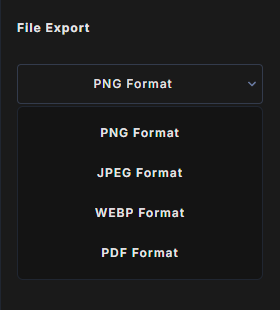
- Choose a format under File Export.
- Set Output Width and Output Height.
- Click Download, or use its keyboard shortcut.
You can also right-click an empty spot of the canvas and choose Download. The file is named after your project's Title, for example My poster.jpg.
Formats
- PNG: sharp, lossless images. Good for graphics, logos and text.
- JPEG: smaller files for photos. Exported at the highest quality.
- WEBP: small, high quality files for the web.
- PDF: a one-page PDF the size of your canvas, with your design as a high quality image. Text in the PDF is part of the image, so it cannot be selected or edited.
Output size
Output Width and Output Height start at your canvas size and keep its proportions: change one and the other follows. The longer side can be up to 4096 pixels, and the shorter side follows your canvas proportions.
- Type
200%to double the size, or a number such as2160. - Changing the canvas size resets the output size to match it.
For a PDF the page stays the size of your canvas. A bigger output size makes the PDF sharper, not bigger.
What is included
- The whole canvas, whatever your zoom level.
- Every visible layer. Hidden layers are left out.
- In 3D view, the 3D environment as the background, and your 3D mockups.
Your design is exported in your browser, so the download starts as soon as it is ready.